
The case for it, made properly
Most password manager reviews treat design as a tiebreaker. For this product it is the argument.
A password manager only works if the household actually uses it. The failure mode is not a broken cipher, it is one person giving up on the browser extension and going back to reusing the same password across forty sites. 1Password’s applications are the best in the category at not causing that, and if you are the person in a family who will be doing support for whatever you choose, that is worth money.
The second argument is the Secret Key, and it is a real piece of security engineering rather than a marketing term.
The Secret Key
At signup, your device generates a long random string. The key that encrypts your vault is derived from that string together with your master password. The server never receives the string in a form it can use.
The consequence is specific. If an attacker takes the stored vault data, as happened to LastPass in 2022, they cannot mount an offline guessing attack using the master password alone, because a factor with far more entropy than any human-chosen password is missing. Weak master passwords, which are the reason people are still having old LastPass vaults cracked years later, do not create the same exposure here.
The trade-off is recovery. Lose both the Secret Key and the master password and there is no reset, because there is nothing on the server that can rebuild the key. That is the correct design and it is also a way to lose everything, which is why the emergency kit is worth printing and storing somewhere physical.
Ownership and jurisdiction
AgileBits Inc. has been Canadian since 2005 and is still founder-led, with no parent company. Canada is a founding member of the Five Eyes, so the jurisdiction sits in the same bracket as Bitwarden’s United States base rather than in the bracket Proton Pass occupies in Switzerland.
The funding is the part more people should know about. The $620M Series C in 2022 valued the company at $6.8B. Nothing about that is improper, and it has funded the engineering that makes the apps as good as they are. It also means an exit is expected at some point, by investors who did not buy in to hold forever. Whether the company that eventually results still behaves like this one is not knowable, and we would rather say so than pretend the question does not exist. Our ownership explorer records structure for exactly this reason.
Audits, without the code
Cure53 has audited 1Password across 2023, 2024 and 2025, covering applications and infrastructure, and the company publishes a security white paper describing the design in more detail than most of its rivals bother with.
That is a good record. It is not equivalent to open source. An audit tells you what an external team found in a defined scope at a point in time. Public code tells you what the software you are running does, continuously, to anyone who wants to look. 1Password gives you the first and not the second, and that is the honest reason it ranks below Bitwarden and Proton Pass on our best password managers page despite having better applications than either.
What it costs
| Plan | Intro | Renewal | True cost per month over 3 years |
|---|---|---|---|
| Individual (1 year) | $35.88 | $35.88 | about $2.99 |
| Families (1 year) | $59.88 | $59.88 | about $4.99 |
| Free tier | none | none | not offered |
Renewal equals the intro price on both plans, which we credit properly: there is no first-year discount unwinding into a larger second bill, the pattern our true cost calculator was built to expose. The refund window is 14 days rather than the 30 most of the category offers.
Families at about $4.99 a month covers five people, which is where the pricing is at its most reasonable. Individual at about $2.99 a month is roughly three and a half times Bitwarden Premium, and what you are buying for the difference is the apps and the Secret Key, not more security primitives.
Features
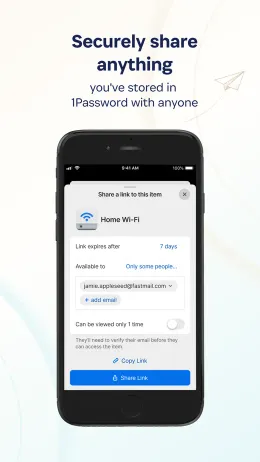
Passkeys, end-to-end encryption, offline vaults, breach monitoring, secure sharing, emergency access, family sharing and browser extensions, across iOS, Android, macOS, Windows, Linux and the browser. Item sharing by link, which is the least awkward way to send someone a credential that we have seen in this category.
Travel Mode is the other standout. It strips selected vaults off a device before a border crossing so that an inspection finds nothing to compel, rather than encrypted data and a person who can be pressed to unlock it. It is narrow, it addresses a real situation, and nothing else here has an equivalent.
Not self-hostable, and there is no plan for it to be. If removing the company from the trust equation matters to you, this is the wrong product.
Who it is for
Households, and people who will pay for software that does not annoy them. If you are choosing on behalf of family members who have never used a manager, the adoption argument is strong enough to outweigh the closed source for many people, and we would rather someone used 1Password than nothing.
If the encryption claim being checkable is the point, this is not the product, and Bitwarden costs a quarter as much. If jurisdiction is the point, Switzerland is available elsewhere. If you want a strong master password to sit in front of that Secret Key, our password generator runs entirely in your browser.
What we have not tested
We have not run our own hands-on testing of 1Password. We have not measured autofill reliability across browsers, import fidelity from other managers, or how recovery behaves when the Secret Key is lost, and we do not publish scores for dimensions we have not measured. Nothing on this page is a benchmark of ours. Those parts of the score stay pending until we do the work.